
Auto Agent
EZ LYNKAuto & Vehicles
4.81.10K Reviews
- Version
- 1.35.1
- Installs
- 100.00K
- Age Rating
- Everyone
Screenshots
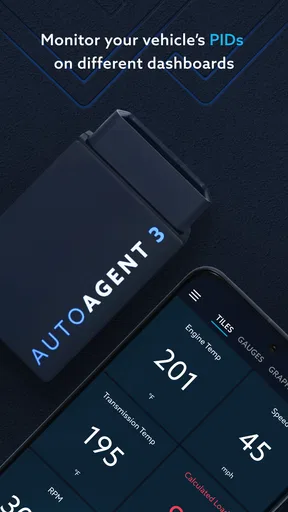
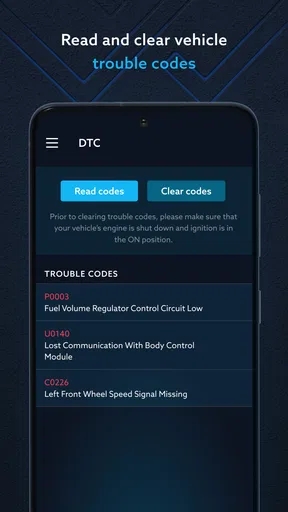
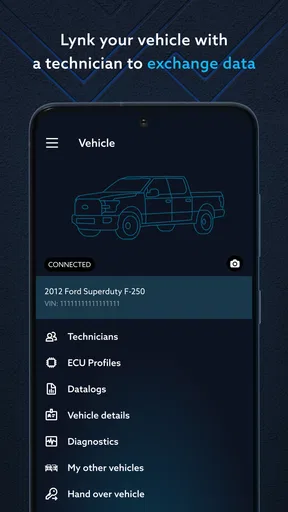
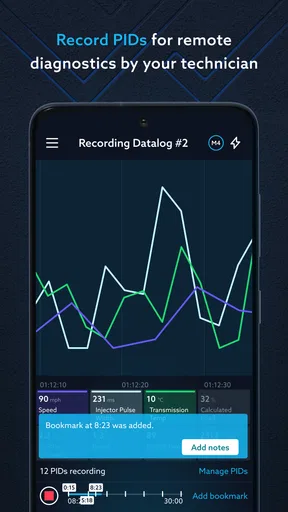
Our Review of Auto Agent
 Analysis by Appyee
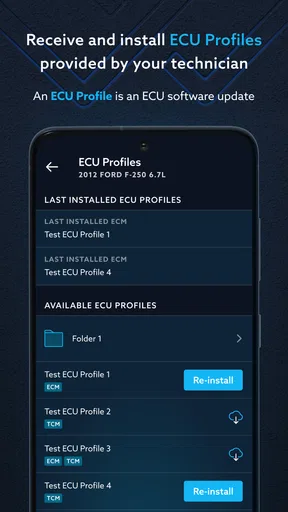
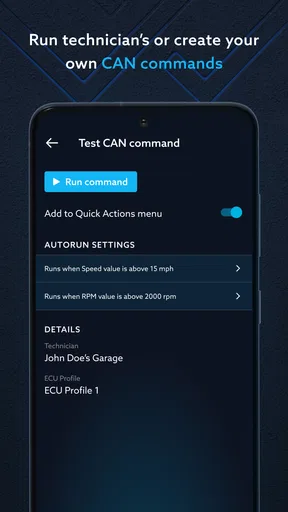
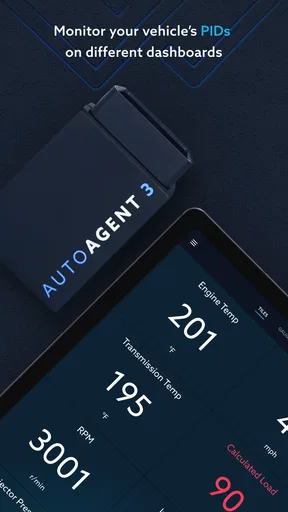
When I look at a vehicle app, I care less about a long feature list and more about whether it helps me understand what is happening without adding stress beside the road. Auto Agent, from EZ LYNK, is aimed at that practical problem: it connects vehicle monitoring, diagnosis and reprogramming in one place. I found it most interesting for drivers who want more information than a warning light provides, especially when they already use compatible vehicle equipment and need a clearer view of a vehicle’s condition.
This is not a general driving companion, navigation tool or fuel tracker. It belongs to the auto and vehicles category, and its usefulness depends heavily on the vehicle setup around it. That distinction matters. If you want an app that simply records journeys or reminds you about maintenance, this is probably more specialized than necessary. If you need a hands-on way to inspect vehicle information and work through technical problems, its focused design makes much more sense.
How Auto Agent feels to use in different situations
I find the app easiest to judge when I separate routine checks from higher-stakes work: a parked review of vehicle information calls for patience, while reprogramming deserves an even more deliberate approach. In this section, I’ll look at how those situations change the way I use the tools and why choosing the right moment can matter as much as knowing where to tap.
Readability and navigation during a technical task
My first impression is that Auto Agent makes more sense when I approach it as a diagnostic workspace rather than a casual mobile app. The important question is not whether every screen feels entertaining, but whether I can move from vehicle connection to useful information without losing track of the task. That kind of clarity is especially valuable when I am already thinking about a dashboard warning, an unusual engine response or a planned software change.
The app’s purpose gives its navigation a natural order: identify the vehicle, inspect available information, diagnose a problem and, where appropriate, handle reprogramming. I would still take time to read each screen carefully instead of tapping through quickly. Vehicle-related actions can have real consequences, so a readable label and a deliberate workflow are more important here than flashy design.
I also appreciate that the app concentrates several technical jobs in one environment. Normally, I might move between the vehicle’s dashboard, a workshop scan tool and a separate service process. Bringing monitoring and diagnosis together can reduce that mental switching. For someone who understands basic vehicle terminology, this can make a complicated situation easier to organize.
That same focus may feel demanding to a first-time user. Auto Agent is not the kind of app I would open expecting it to explain every mechanical concept in everyday language. A driver who is unfamiliar with diagnostic information may need help from a technician or an experienced vehicle owner. The interface can present information, but understanding what deserves attention is a separate skill.
For readability, I would use the app with the phone positioned securely and the display set to a comfortable size before starting. Enlarging system text can help some people, but it may also make dense screens less convenient if the layout does not adapt smoothly. I would not make changes while driving. The safest workflow is to review information while parked, then decide what to do next without rushing.
One useful habit is to separate observation from action. I can first check what the app reports, note the symptoms I have noticed, and only then consider a diagnostic or reprogramming step. That approach is more accessible for users who need extra time to process technical information, and it also reduces the chance of making a hurried decision.
Motor and sensory considerations
Auto Agent may be helpful for people who prefer to inspect vehicle information visually instead of relying only on a dashboard warning. A warning light is brief and often vague; a dedicated diagnostic view can give me a more deliberate place to review what is going on. That can support users who need to pause, zoom the phone, or revisit information at their own pace.
At the same time, a phone screen is still a phone screen. Small controls, dense technical text or a need to connect hardware can be difficult for users with limited fine-motor control, reduced vision or hand tremors. I would prepare the connection while parked and use both hands if necessary rather than trying to manage the phone in a moving vehicle. A stable surface or a suitable phone mount may make the physical side of the task easier, but the mount should never encourage interaction while driving.
Users with hearing loss may find a visual diagnostic workflow more useful than an audible alert alone, because the central information is presented on the screen. Users with low vision may benefit from the phone’s own accessibility settings, such as text enlargement or display contrast adjustments, although the practical result will depend on how Auto Agent’s screens respond. I would test those settings before relying on the app during an urgent vehicle problem.
People sensitive to glare or visual clutter should choose the environment carefully. Bright sunlight can make any phone display harder to read, while a dark cabin may create its own contrast and eye-strain problems. I would rather inspect the app in a well-lit, stationary setting than attempt to interpret technical information in poor conditions.
The motor trade-off is clear: combining monitoring, diagnosis and reprogramming can reduce the number of tools I need to handle, but it also places important interaction on a touchscreen. Someone who finds repeated tapping, precise selections or cable handling tiring may prefer a workshop to perform the technical work. That is not a failure of the app; it is a reminder that digital convenience does not remove the physical demands of vehicle service.
Situational access on the road and at home
The best everyday scenario for Auto Agent is not an emergency at the roadside. Imagine I notice that my vehicle feels different during a normal trip, then park safely at home. Instead of guessing from the dashboard, I can use the app to review available vehicle information and organize the symptoms I noticed. If the information points toward a technical issue, I have something more useful to discuss with a qualified person than a vague statement that the car “doesn’t feel right.”
That workflow can also help when preparing for a service appointment. I can inspect the vehicle before calling, record the relevant details for myself and avoid forgetting the sequence of events. The app does not replace mechanical judgment, but it can make the conversation more precise. This is one of its strongest practical advantages over a basic maintenance reminder.
For a vehicle owner who manages more than one vehicle, the value may come from having a consistent place to approach technical checks. I would still verify that the particular vehicle and connected equipment are supported before building a routine around it. The app’s usefulness is not universal across every car, truck or equipment setup simply because it is available on a phone.
Auto Agent is also better suited to planned work than rushed work. Reprogramming is the clearest example. I would only begin that process when the vehicle is stationary, the phone has enough power, the connection is dependable and I have enough time to respond to instructions carefully. A user who needs instant roadside reassurance may be better served by roadside assistance or a repair professional.
For users with different cognitive needs, a written routine can make the experience less overwhelming: park, connect, read the vehicle status, note the issue, and stop if the next step is unclear. I would avoid multitasking with passengers, traffic, tools or phone calls. A simple sequence turns a technical app into a more manageable task and makes it easier to ask for help at the right moment.
There is also a useful distinction between monitoring and reprogramming. Monitoring can support regular awareness, while reprogramming is a more consequential activity that deserves a higher level of confidence. I would not treat the two functions as equally casual. If I am unsure what a change will do, I would stop and consult a qualified technician rather than experimenting through the app.
Where the usual alternatives may be better
Compared with a standard vehicle dashboard, Auto Agent can offer a more focused place to investigate information, but the dashboard remains faster for immediate warnings. Compared with a generic maintenance app, it is more technical and potentially more useful for diagnosis, yet less suitable for simple service reminders. Compared with a workshop scan tool, it offers the convenience of a mobile workflow, while a professional has broader experience, equipment and responsibility for interpreting results.
That comparison helps define the right audience. I would recommend it to an owner, enthusiast or technician who already has a reason to monitor, diagnose or reprogram a compatible vehicle. I would not recommend choosing it merely because it is free. Free installation does not make a specialized diagnostic workflow the right tool for every driver, particularly when the app’s in-app purchases range from $1.99 to $199.99 per item. I would understand the purchase path before starting any paid work.
The app is available for everyone in its content rating, and the developer is EZ LYNK. It has been on the platform since September 20, 2016, which gives it a longer presence than a brand-new automotive utility. Its current version is 1.35.1, and it requires Android 6.0 or later. Those details make it approachable for people using an older Android phone, although I would still keep the device and operating system in good working order for a connection-dependent vehicle task.
Its public reach is also substantial, with over 100 thousand installs, a 4.8 average from around 3 thousand ratings, and roughly 1.1 thousand written reviews. I see that as encouraging evidence that many users find the concept worthwhile, but popularity cannot answer the most important question for me: whether my vehicle and equipment fit the intended workflow. Compatibility and technical confidence matter more than the headline rating.
Remaining barriers before I would rely on it
The biggest barrier is the gap between displaying technical information and interpreting it correctly. A code or reading can point toward an area of concern without identifying the complete repair. If a user treats every result as a final diagnosis, the app could create false confidence. I would use it to gather evidence and guide a conversation, not as permission to ignore mechanical symptoms or safety warnings.
Another barrier is the physical connection between the phone, the vehicle and any required hardware. This can be awkward for someone with limited reach, reduced dexterity or difficulty working in a cramped area. It can also be inconvenient in bad weather or low light. A person who cannot comfortably complete that setup should arrange assistance rather than forcing the task.
There is a financial consideration as well. Although the app itself is free to download, optional purchases can be significant depending on the item. I would look carefully at what a purchase enables before confirming it, especially if I am testing the app for the first time. A free entry point is useful, but it should not be confused with a completely cost-free diagnostic or reprogramming process.
Technical dependence can create another form of exclusion. Someone with an unreliable phone, limited data access, difficulty reading technical English or no nearby help may find the workflow harder than an experienced user does. I would prepare offline notes about the vehicle symptoms, keep a backup way to contact assistance and avoid making the app the only plan for a serious fault.
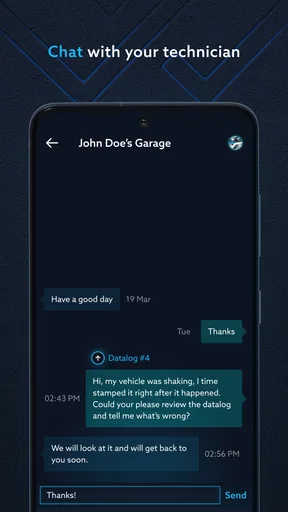
Finally, the app is not a substitute for accessible service. If I need a mechanic, I still need a person who can explain the result, communicate patiently and physically inspect the vehicle. Auto Agent can improve the information I bring to that interaction, but it cannot remove the need for human support when the problem is complex.
My inclusive verdict
I see Auto Agent as a specialized tool with real value when its monitoring, diagnostic and reprogramming functions match the vehicle owner’s needs. I like the possibility of replacing guesswork with a more organized technical check, and I think the app can support different users when they work slowly, park safely, adjust the phone for comfortable reading and ask for help with interpretation.
Its inclusive strength is flexibility of context rather than a promise that every user will find it effortless. A confident vehicle owner may appreciate having a mobile diagnostic workspace. A driver who only wants maintenance reminders may find it unnecessarily technical. Someone with limited motor control, low vision or difficulty processing dense information should test the complete connection and reading workflow before depending on it.
My recommendation is therefore conditional but positive: choose Auto Agent when you have a compatible reason to use vehicle diagnostics and are prepared to treat reprogramming as serious technical work. Skip it in favor of a workshop, roadside service or a simpler maintenance app when you need immediate assistance, plain-language guidance or a tool that requires almost no setup. Used with that realistic boundary, Auto Agent is most valuable as a careful bridge between a dashboard warning and an informed service decision.
For me, the defining lesson is simple: the app can make vehicle information easier to reach, but the safest experience comes from combining it with patience, a stationary workspace and sound mechanical judgment. That balance lets more people benefit from its focused tools without pretending that a phone can solve every vehicle problem on its own.
Verdict
Strengths of Auto Agent
- Automates repetitive tasks without requiring constant manual input.
- Can help organize workflows and reduce time spent on routine actions.
- Useful for users who want an assistant-like experience on mobile.
- May improve productivity by handling several steps in sequence.
- Its practical focus makes it suitable for everyday automation needs.
Limitations of Auto Agent
- Some features may require careful setup before working as expected.
- Automation results can vary depending on the device and installed apps.
- Users may need to grant broad permissions for certain actions.
- Background activity could affect battery life on some smartphones.
- Not every task may be supported, limiting its usefulness for advanced workflows.
Similar Picks in This Category
View All
Android Auto
Google LLC4.1

maxim — order a taxi & food
PT. SITO4.7

Штрафы ГИБДД: проверка с фото
Pays LLC – Штрафы ГИБДД4.7

Номерограм – проверка авто
Авто Ассист4.8

Дром Авто
Дром4.9

Frequently Asked Questions
What is Auto Agent and what can I use it for?
Auto Agent is an automation-focused app designed to help users perform repetitive actions on a mobile device with less manual input. Depending on the version and supported device, it may assist with tasks such as launching apps, following predefined routines, managing actions, or responding to simple triggers. Its usefulness depends on the permissions it receives and the automation features available on your Android or iOS version.
Is Auto Agent safe to download and use?
Auto Agent should be downloaded only from a trusted source, such as the official Google Play Store or Apple App Store, when an official version is available. Because automation apps may request access to accessibility services, notifications, device controls, or other sensitive functions, review every permission carefully before accepting. Avoid unofficial modified versions, and uninstall the app if it behaves unexpectedly or requests access unrelated to its advertised purpose.
Which devices and operating systems are compatible with Auto Agent?
Compatibility can vary depending on the Auto Agent release, your phone model, and the operating system installed on the device. Android versions often provide broader automation access through accessibility and system settings, while iOS may impose stricter limitations on background activity and device control. Before downloading, check the store listing for minimum requirements, supported languages, update history, and any device-specific restrictions.
Does Auto Agent require special permissions or technical configuration?
Auto Agent may need more setup than a typical utility app because automation usually depends on permissions that allow the app to detect events or interact with other applications. You may be asked to enable accessibility access, notifications, background activity, or battery exceptions. Only activate permissions you understand, and remember that menus can differ between devices. Incorrect settings may prevent automations from running reliably.
Is Auto Agent free, and are there any limitations or extra costs?
The availability of free features, premium tools, advertisements, subscriptions, or in-app purchases depends on the current version of Auto Agent and the platform where it is installed. The free edition may limit the number of routines, advanced actions, usage frequency, or customization options. Review the app’s store page and purchase screen carefully so you understand recurring billing, trial periods, and cancellation terms before upgrading.
